FTA Simulator
Fault Tree Analysis
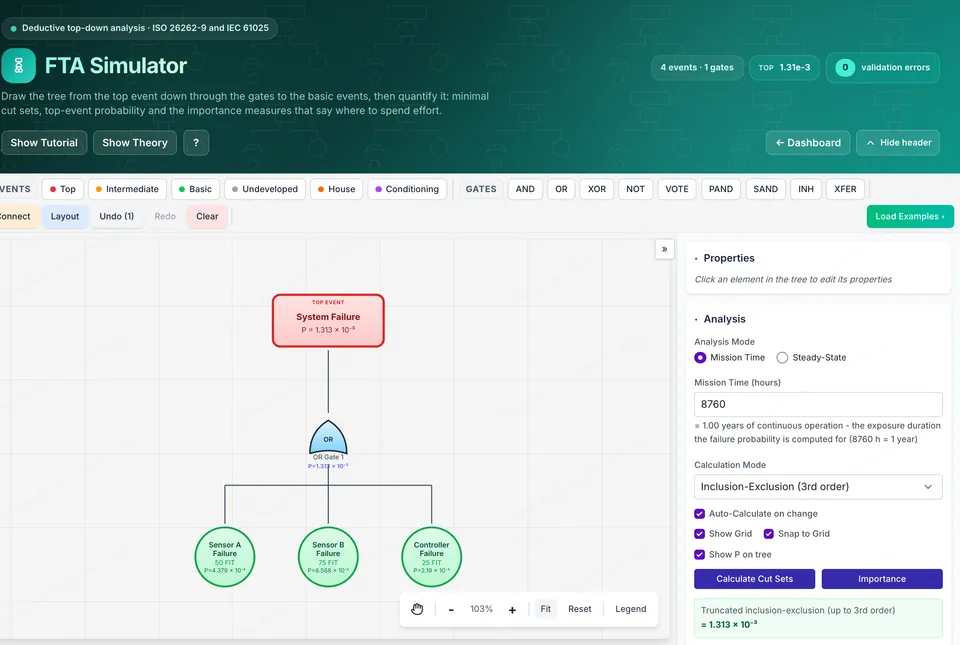
Drag-and-drop fault tree builder for quantitative reliability analysis. Quantify top-event probability and rank basic events by contribution before you commit to a hardware architecture.
- Visual tree builder: AND, OR, XOR, NOT, VOTE, PAND, SAND, INHIBIT gates
- Minimal cut sets via MOCUS
- Importance measures (Birnbaum, Fussell-Vesely, RAW, RRW)
- Reliability metrics: MTTF, MTBF, system probability
- Real-time validation and error reporting
- Export and import JSON models
Launch FTA0FMEA Simulator
Failure Mode & Effects Analysis
AIAG-VDA FMEA workbench with automatic RPN scoring, linked to ISO 26262 safety goals, FSC and TSC. Prioritize design FMEA actions or scaffold an FMEA-MSR for diagnostic and system-response coverage.
- AIAG-VDA FMEA with automatic RPN scoring
- System, subsystem and component hierarchy
- Linked to ISO 26262 safety goals, FSC and TSC
- Risk matrices and heat maps
- FMEA-MSR for diagnostic and system response coverage
- Analytics dashboard with status and KPI tracking
Launch FMEA1FMEDA Simulator
Hardware Safety Analysis
Click-through TCU power-supply schematic with failure modes and diagnostic coverage from ISO 26262-5 Annex D. Computes SPFM, LFM and PMHF live as you swap safety mechanisms, so you can find architecture gaps before committing to a board layout.
- Interactive TCU schematic with clickable components
- SPFM, LFM and PMHF with ASIL target comparison
- Compare preliminary vs ASIL-C compliant architecture
- 15+ safety mechanisms with DC values from Annex D
- Real-time metric recalculation
- Safety goal context: ASIL, safe state, FTTI
Launch FMEDA2Markov Chain Simulator
Continuous-Time Markov Reliability
Continuous-Time Markov Chain simulator that derives SPFM, LFM and PMHF straight from the generator matrix Q per ISO 26262-5 Annex C/F. Ships with three worked examples (1oo2 braking, ADAS sensor fusion, BMS dormant faults) and re-solves P(t)=e^Qt live as you tune failure, diagnostic, CCF and repair rates. Free for every registered user.
- Free for all registered users
- Three worked examples: braking, ADAS sensor fusion, BMS
- Live state probability and steady-state computation
- SPFM, LFM and PMHF per ISO 26262-5 Annex C/F
- Full failure-rate breakdown for FMEDA
- Tune failure rate, DC, CCF, repair and proof-test rates
Launch Markov3STPA Simulator
Systems-Theoretic Process Analysis
Work an STPA from losses and hazards through the control structure to unsafe control actions and causal scenarios. Catches control and interaction flaws that component-level FMEA misses, which matters for ADAS functions where nothing has actually broken yet.
- Losses, hazards and system-level constraints
- Control structure with controllers and feedback paths
- Unsafe control actions across all four UCA guide words
- Causal scenarios by controller, feedback, control path and process
- Traceability from loss to hazard to UCA to scenario
- Four worked examples: ACC, AEB, LKA, battery thermal
Launch STPA4DFA Simulator
Dependent Failure Analysis
Dependent failure analysis per ISO 26262-9 Clause 7. Walk the DFI checklist against your architecture, state the independence you are claiming, and see whether the safety measures actually support a decomposition before an assessor asks.
- DFA worksheet structured on ISO 26262-9 Clause 7
- Independence and freedom from interference requirements
- Dependent failure initiator (DFI) checklist
- Safety measures against common-cause and cascading failures
- Results and coverage metrics
- Four worked examples incl. ASIL D braking decomposition
Launch DFA5Cascading Failure Simulator
Propagation & Freedom From Interference
Model elements and their dependencies, inject a fault, and watch it propagate. Audits freedom from interference against the ISO 26262-6 Annex D interference classes and reports the blast radius, which is the argument you need for mixed-criticality partitioning.
- Element and dependency modelling
- Fault injection with live propagation
- FFI audit against ISO 26262-6 Annex D interference classes
- Blast radius per injected fault
- Analysis worksheet with findings
- Four worked examples incl. mixed-criticality cockpit ECU
Launch Cascading6HAZOP Simulator
Hazard and Operability Study
Guideword-driven deviation analysis following IEC 61882. Define the system and its parameters, drive guide words across them to surface deviations, causes, consequences and safeguards, then rate the residual risk.
- IEC 61882 guideword-driven deviation analysis
- System definition with functions and parameters
- Worksheet: deviation, cause, consequence, safeguard
- Risk rating per deviation
- Export and import JSON studies
- Four worked examples incl. EPS assist torque and HV charging
Launch HAZOP7GSN Safety Case Simulator
Goal Structuring Notation Builder
Build a safety case argument from goals, strategies, solutions, context and assumptions. Validates the structure against GSN Community Standard connection rules and flags undeveloped goals, so you find the holes in the argument rather than in the assessment.
- Goals, strategies, solutions, context and assumptions
- Legal structure validation per GSN Community Standard
- Permitted connection rules enforced as you build
- Metrics and evidence completeness checks
- Export and import JSON arguments
- Four worked examples incl. ASIL D braking and SEooC
Launch GSN8